
If you’re running a Shopify store, you’ve probably set up discount codes countless times. But there’s a powerful feature that most store owners don’t know about. That is discount URLs that automatically apply codes at checkout.
I took a phone call recently in my capacity as an ecommerce consultant that helped a client solve a problem that you may recognise.
They’d set up a “Friends & Family” sale with a 35% discount code, sent it out to their VIP list, and watched the traffic roll in. People visited the sale collection, browsed the products BUT they didn’t convert.
The culprit? They simply forgot to enter the discount code at checkout.
The Problem with Standard Discount Codes
If we are honest, discount codes can create friction. They require customers to:
- Remember the code exists
- Find where they saved it
- Locate the discount code field (which isn’t always obvious on mobile)
- Type it in correctly
- Click apply
That’s a lot of steps to take between “I want this” and “I’m buying this”. And every step is an opportunity for your customer to abandon their purchase. Even with abandoned basket flows in place, the friction is just too much
.
Introducing the Discount URL
Here’s the trick that Shopify doesn’t seem to shout about: you can auto-apply discount codes using a special URL format.
Instead of linking to:
https://yourstore.com/collections/saleYou link to:
https://yourstore.com/discount/YOURCODE?redirect=/collections/saleThat’s it. The code is applied the moment they land, and it stays applied for their entire session.
How It Works
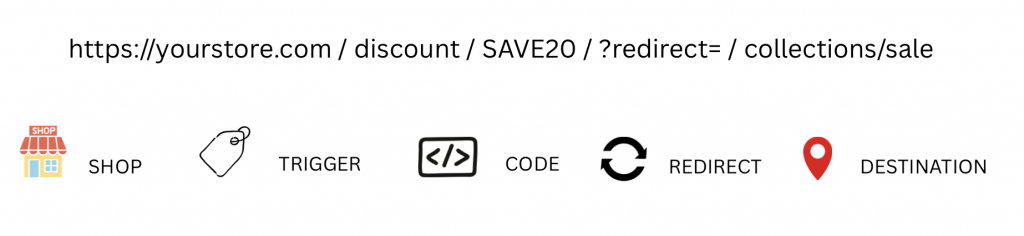
The URL structure is simple:
https://yourstore.com/discount/[CODE]?redirect=[DESTINATION]Breaking it down:
/discount/tells Shopify you’re applying a code[CODE]is your actual discount code (case-sensitive)?redirect=is where you send them after the code is applied[DESTINATION]can be a collection, product, or your homepage
Real-World Examples
Sale collection:
https://yourstore.com/discount/SUMMER25?redirect=/collections/summer-saleSpecific product:
https://yourstore.com/discount/VIP20?redirect=/products/bestseller-teeHomepage:
https://yourstore.com/discount/WELCOME10?redirect=/When to Use This
This technique works brilliantly for:
- Email Campaigns: Instead of saying “Use code SAVE20”, make the entire CTA button a discount URL. One click, and they’re shopping with the discount already applied.
- SMS Marketing: Discount URLs are perfect for text messages where character count matters and you don’t want customers fumbling with codes on their phones.
- VIP/Private Sales: Share a private link to your VIP customers. No code to remember or share publicly – just a direct link to their exclusive offer.
- Social Media: Works well on Instagram Stories or TikTok where you can’t hyperlink traditional text. Put the discount URL in your bio or link tree.
- Influencer Partnerships: Give influencers unique discount URLs to share. Easier for their followers, and easier for you to track which influencer drove the sale.
The Limitations (Be Aware)
Before you rush off to implement this everywhere, here are the gotchas:
- It’s session-based, not permanent: If a customer clears their cookies or switches devices, the discount disappears. It’s not as bulletproof as automatic discounts.
- Only works if they use your link: If someone finds your products via Google, Instagram product tags, or direct URL entry, the discount won’t be applied. This is purely for directed traffic.
- URL must be exact: Codes are case-sensitive and can’t have spaces.
SAVE20works;save 20doesn’t. - Can’t combine with other codes: Like all Shopify discount codes, these won’t stack with other codes (though they can stack with automatic discounts, depending on your settings).
Discount URLs vs Automatic Discounts
You might be thinking: “Why not just use automatic discounts?”
It’s a fair enough question. In my experience this is when each makes sense to use:
Use automatic discounts when:
- You want the discount to apply site-wide or to specific collections/products automatically
- You’re running a public sale that everyone should see
- You want the discount to show in product prices on collection pages
Use discount URLs when:
- You want to track different sources (email vs SMS vs influencer)
- It’s a private or exclusive offer
- You need the code to appear in checkout (some apps and reports key off this)
- You want to retain control over who gets the discount
Advanced Tip: Hybrid Approach
My client ended up using a hybrid approach. They kept the discount code for their regular customers who might bookmark products, but used discount URLs for their email and SMS campaigns.
Result? Their VIP sale conversion rate jumped by 40% compared to their previous code-only campaign.
How to Implement This Today
Here’s your action plan:
- Identify your next campaign where you’d normally share a discount code
- Create the code in Shopify as normal (Discounts > Discount codes)
- Build your URL using the format above
- Test it – click the link in an incognito window to verify the code applies
- Use it in your email, SMS, or social media campaign
- Track the results against your previous code-only campaigns
In Conclusion
Discount URLs aren’t a replacement for all your discount strategies, but they can be a powerful tool to add to your arsenal that’s been sitting in your Shopify weaponry unused.
The next time you’re about to send an email blast saying “Use code SAVE20 at checkout”, stop. Ask yourself: “Would a discount URL make this easier for my customers?”
Quite possibly the answer will be yes.
And easier for your customers means more sales for you.
Want help optimising your Shopify store for more conversions? I’m Mark Logan, an ecommerce consultant specialising in Shopify stores turning over £100k-£10m. Get in touch to discuss how I can help grow your ecommerce business.