
On my first proper day auditing the SEO of a new client’s Shopify store, I found something that I’ve never seen before as an ecommerce consultant. It wasn’t a missing meta description or a poorly structured heading tag. Those kinds of things are the bread and butter of any site audit. This was something completely different.
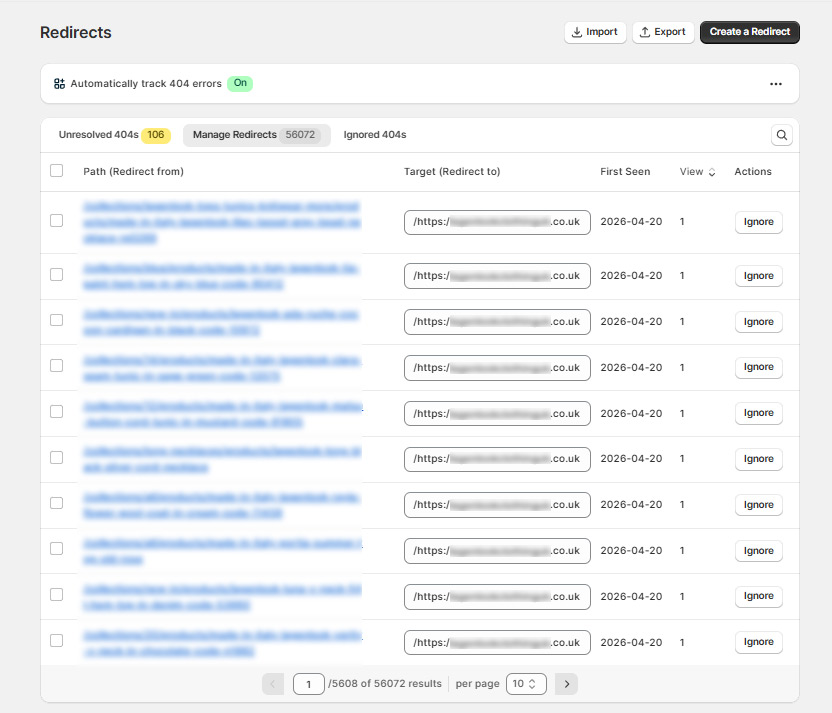
While digging through their URL redirects in Shopify, I kept seeing destination URLs that looked wrong. Really wrong. Instead of pointing to a collection page or product URL, they were resolving to something like this:
https://siteurl.co.uk/https:/siteurl.co.uk#gbaid33002
That’s not a real URL. The domain appears twice, there’s a malformed https:/ in the middle and a #gbaid33002 tacked on the end. I’d never seen anything quite like it.
What is #gbaid?
Before getting into how this happened, it’s worth explaining what #gbaid actually is, or at least what I believe it to be, because there’s very little written about it and what does exist isn’t particularly clear.
#gbaid is a Google Ads attribution parameter, believed to be part of Google’s newer privacy-safe tracking methods. It tends to appear in environments where traditional cookie-based tracking is limited. For example iOS, Safari or certain app-to-web flows, and shows up alongside other attribution parameters like gclid and wbraid. Unlike gclid, it isn’t appended on every ad click, so you may never have noticed it.
It appears after a hash in the URL, which makes it a fragment identifier. Fragments aren’t sent to the server. They are handled client-side by the browser, so under normal circumstances it disappears during navigation without causing any problems. Google never intended it to persist beyond the initial landing.
The catch is that “normal circumstances” doesn’t always apply. If a redirect app or script intercepts the URL before the browser completes navigation, it can mistakenly capture and preserve the fragment. At that point it stops behaving like a harmless tracking parameter and starts getting treated like part of the URL itself — passed through redirect chains, stored in logs, and in this case, used to generate entirely new redirect entries.
That’s exactly what was happening here.
Three SEO Apps, One Problem
The client had three SEO apps installed simultaneously: Tapita SEO, TinySEO and SEOwill. Running multiple SEO apps on a single Shopify store is something I’d generally advise against in any case, since they often conflict with each other and duplicate functionality. But SEOwill was where the damage was coming from.
SEOwill is a redirect management app that, among other things, lets you set up wildcard redirects. These are rules that catch any URL matching a given pattern and send it somewhere else. It should be useful in theory. However the problem was that whoever set it up in June 2022 made a typo in the destination URL.
The wildcard redirect was configured as:
- Path: /*
- Target: /https:/siteurl.co.uk
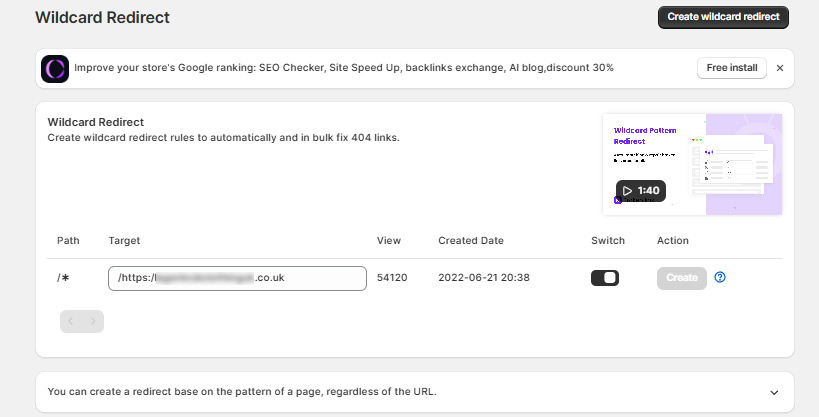
Can you see the issue? There’s a forward slash before https. That single character – /https:/ instead of https:// – made the destination URL completely invalid. Rather than redirecting everything to the homepage, it was redirecting everything to a path that doesn’t exist, appended to the site’s own domain.
So any URL that hit the wildcard rule resolved to https://siteurl.co.uk/https:/siteurl.co.uk. Completely dead and useless.
Where the #gbaid Comes In
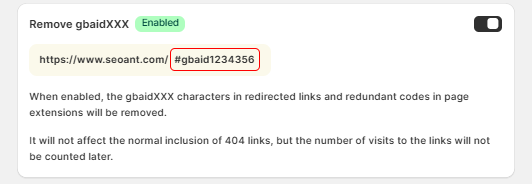
SEOwill also has a setting called “Remove gbaidXXX” which, when enabled, strips the #gbaid tracking parameter from URLs before processing them. This is the correct behaviour, as I mentioned, #gbaid is a harmless fragment that shouldn’t be treated as part of the URL.
That setting was disabled which I’ve now changed.
So here’s what was happening every time someone clicked a Google Ad that pointed to this store:
- Google appends #gbaid[number] to the landing page URL
- The user’s browser loads the page. So far, normal
- SEOwill sees a URL with #gbaid in it, treats it as a unique broken URL, and creates a redirect for it
- That redirect points to /https:/lagenlookclothinguk.co.uk. This is the broken destination
- The next time anyone hits that URL, they get sent to a dead page
Repeat that process for every Google Ads click over four years and you end up with what I found; 56,083 redirect entries in SEOwill, of which 53,994 were broken.
What This Was Actually Doing to the Site
From the front end, the site looked completely normal. Pages loaded, products were visible, checkout worked. This is why it went unnoticed for so long.
But behind the scenes, several things were going wrong.
Google was spending crawl budget visiting thousands of broken URLs. Every time Googlebot followed one of these redirect chains it hit a dead end, wasting the crawl allocation that should have been spent on actual product and collection pages.
Redirect loops were forming on important pages. When I first tried to set up a redirect for a ghost URL that was ranking in Google, Shopify threw a “redirected too many times” error. The SEOwill wildcard was intercepting the redirect chain and sending it into a loop before it could resolve.
The store’s indexed page count was affected. With 56,000 broken redirect entries competing for crawl budget, legitimate collection and product pages were inevitably being crawled less frequently.
How to Check If You Have the Same Problem
If you’re running SEOwill or any similar redirect app on Shopify, here’s how to check:
- Go into the app and look for a Wildcard Redirect section. If you have a /* wildcard set up, check the destination URL carefully. It should start with https:// — two forward slashes after the colon. If it starts with /https:/ or any variation with a slash before the protocol, it’s broken.
- Then check your Manage Redirects tab and look at the Target column. If you see entries resolving to your own domain with /https:/ in the middle, you have the same problem. Export the list and you should be able to see when the issues first started
- Also look for a setting to strip #gbaid or similar tracking parameters. If it’s disabled, enable it before doing anything else to stop new broken entries being created.
The Bigger Point
This had been running since June 2022. The store had an SEO resource with access to the account the whole time.
I’m not writing this to point fingers at whoever set it up. A typo in a destination URL is an easy mistake to make and the consequences aren’t obvious from the front end. But it does illustrate something I see regularly in that SEO apps get installed, configured once and then never checked again. The assumption is that if the site is functioning normally, everything must be fine.
It’s often not.
If you haven’t audited the apps running on your Shopify store recently, not just whether they’re active, but what they’re actually doing, it’s worth an hour of your time. You might not find 56,000 broken redirects. But you might find something you’d rather know about.