
If you run an online store, here is the short version of the PHP2Shell issue instead of all of the jargon and scaremongering you’re reading online and in the news.
Just yesterday (21 October 2026) a serious security flaw called PHP2Shell was made public. If your store is on Shopify, you are fine and there is nothing for you to do. If it runs on WordPress, WooCommerce, Magento or a bespoke build, you need to check one thing today. That is that whoever looks after your site has patched it, or is actively working on it. You almost certainly don’t need to fix anything yourself. You do need to make sure someone is.
What is PHP2Shell, in plain English?
PHP is the behind-the-scenes technology that powers a huge portion of the web, including a lot of the platforms online shops are built on. Two critical flaws have been found in PHP itself, rated 9.2 out of 10 for severity. They’ve been nicknamed PHP2Shell because a successful attack lets a hacker install a hidden control panel on your server, with no username or password needed.
The important bit for you is that this is a flaw in PHP, not in a single plugin or app. That means it affects many different platforms at once. It is already being attacked in the wild, with the first attempts spotted even before it was made public. So this is not a theoretical “keep an eye on it” situation. It is live.
Is my store affected?
It depends entirely on what your site is built on.
- Shopify, and other fully hosted platforms like BigCommerce, Squarespace and Wix: not your problem. The fix is the platform’s job and it’s handled for every store centrally. Nothing for you to do.
- WordPress and WooCommerce, Magento and Adobe Commerce, Drupal, Joomla, or a bespoke PHP site: potentially affected if it’s running a version of PHP that hasn’t been patched.
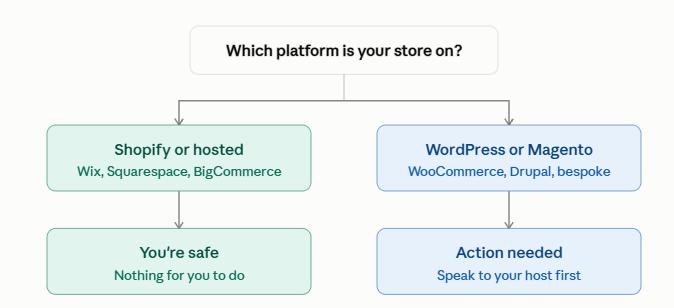
Not sure what your site is built on? Run your web address through a free tool like BuiltWith or Sucuri SiteCheck. It’ll tell you your platform and flag any obvious problems. It won’t tell you your exact PHP patch level, but it’ll tell you whether this article applies to you at all.
One caveat is that even if your shop is on Shopify, you might have a separate self-hosted piece sitting alongside it, such as a WordPress blog on a subdomain or a custom integration. The shop itself is safe. Anything bolted on next to it that you host yourself might not be.
I have an agency or developer. What should I do?
Contact them today and ask two simple questions:
- Is our site running a patched version of PHP? (The safe versions are 8.2.35, 8.3.36, 8.4.27 or later.)
- Have you checked the site for any sign it was already targeted?
You don’t need to understand the technical answers. You need to know the work is in hand.
Here’s the honest part, from years of running this kind of thing. On a large or older store, especially a Magento build or anything heavily customised, updating PHP is not a quick switch. It can mean testing every integration, every piece of custom code and every checkout path, then quality-checking all of it before it goes live. On a big site that can genuinely run to days or weeks of work and a real bill. I’ve been in those rooms. If your agency quotes you something significant, they’re very probably not inventing it.
That is the reason to act, though, not to delay. The temptation when a fix sounds slow and costly is to leave it and hope for the best. With something being actively exploited right now, hoping is the risk. If the full job is big, ask your agency for a phased plan: what can be done immediately to cut the risk (patching the PHP version, adding a firewall rule), and what needs proper testing afterwards. You can manage the cost without ignoring the threat.
I used to have an agency but now manage the site myself. What do I do?
Plenty of store owners have parted ways with their agency or developer and now run things themselves. If that’s you, you need to understand your options rather than hand you a checklist, because the right move for each individual depends entirely on what your site is built on, and I can’t see that from here.
What I won’t do is give you step-by-step instructions to change your PHP version yourself. On a site that’s taking money, that’s risky advice. A WordPress store, a Magento store and a bespoke build each behave completely differently when PHP changes underneath them, and what’s safe on one can break the checkout on another. The switch itself could take seconds but undoing the damage if something isn’t compatible does not.
So here’s who to speak to, in order:
- Your hosting company first. They’re the ones running the servers your site sits on, and many are already patching their infrastructure and PHP versions in response to this. A quick message or look at their status page tells you what they’re doing automatically and what they expect you to do. Start here before you touch anything.
- Your developer or an agency second. If your host says the PHP version on your site is your responsibility, this is the point to bring in someone who can check compatibility, back the site up and carry out the upgrade without taking your shop down. This is a sensible one-off job. You don’t need a monthly retainer to get it done safely.
If you’re technical enough to handle the upgrade yourself, you almost certainly don’t need this article. For everyone else, the cost of an hour of a developer’s time is tiny next to the cost of a broken or compromised store, and far less stressful.
What should I do next?
Three steps, in order:
- Work out your platform. Shopify, you can relax. Anything PHP-based, keep going.
- Either confirm your agency is on it, or patch and scan the site yourself but this comes with risks mentioned above.
- Don’t file this under “later.” It’s being exploited now, and the cost of a compromised store (downtime, lost sales, the cleanup bill and the hit to customer trust) is far higher than the cost of patching.
Being vulnerable doesn’t mean you’ve been hacked. But doing nothing is the one option that isn’t sensible.
Frequently asked questions
Do I need to do anything if my store is on Shopify?
No. Shopify is fully hosted, so patching is Shopify’s responsibility and it’s done centrally. Any apps you use run on their own developers’ servers, so that’s on them too. There’s nothing for you to action on your store.
My site seems to be working fine. Does that mean I’m safe?
Not necessarily. A site can be compromised and still look and behave completely normally, because this kind of attack is designed to stay hidden. “Working fine” is not the same as “checked.”
How do I find out which PHP version my site uses?
Ask your host or developer, or look in your hosting control panel under something like “PHP version.” If you’re not even sure who hosts your site, a tool like BuiltWith can point you in the right direction.
My agency says the fix will cost a lot and take time. Are they overcharging me?
Probably not. On larger or customised stores, updating PHP safely means testing everything that could break and checking it before launch, which is genuine work. Ask for a phased plan so you cut the immediate risk quickly and spread the bigger job out sensibly.
What actually happens if I ignore it?
An attacker could take control of your server, steal customer data, take your site offline, or quietly use it to host malicious content. Recovering from that costs far more in money, time and trust than patching ever would.