
The Problems With Duplicating Products in Shopify
Duplicating products in Shopify is the fastest way to build a catalogue. Most online stores do it. I fully appreciate that when you are loading thousands of SKUs a season, copying an existing product and editing it beats starting from scratch every time.
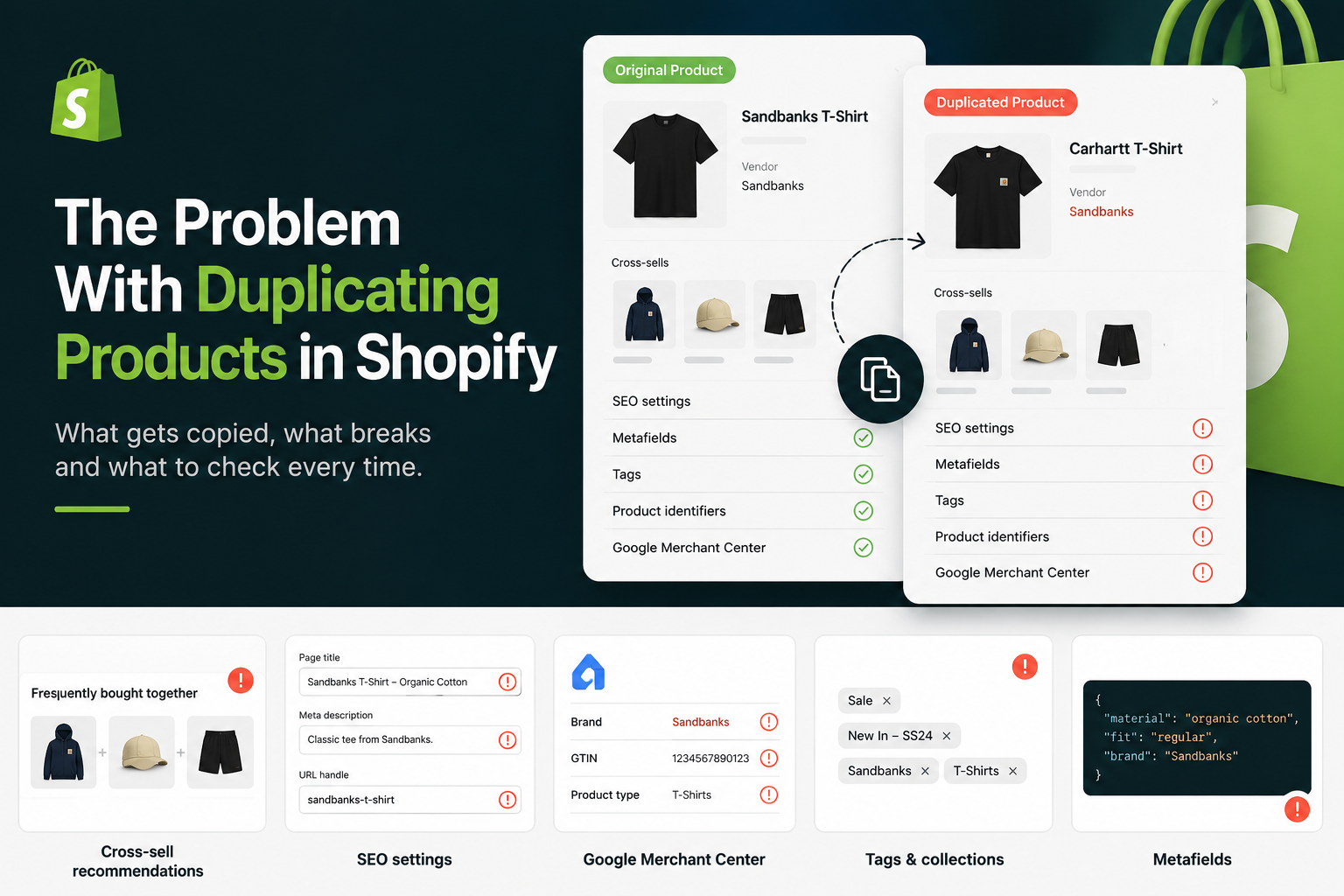
The problem is that duplication copies a lot more than the fields that you can see, if you don’t realise how the process works and this can lead you into trouble. It can duplicate:
- Cross-sell recommendations
- SEO settings
- Metafields
- Vendor
- Tags
- Product identifiers
If you don’t realise that all of this is being copied, or forget to check and edit them, you end up with things like the wrong brand’s recommendations on a page, broken URLs and duplicate meta data that stops the product ranking. This guide covers the eight things that can break when you duplicate a product in Shopify, and what you should check on every copy, whether you run the store yourself or manage the catalogue as part of a wider ecommerce team.
In This Article
- Why does duplicating products in Shopify cause problems?
- The cross-sell glitch nobody warns you about
- Which SEO settings copy when you duplicate a product?
- What copies into your Google Merchant Center feed?
- What copies to the storefront that customers see?
- What does not copy across (and catches teams out)?
- The duplicate product checklist
- Frequently asked questions
Why Does Duplicating Products In Shopify Cause Problems?
Duplication is a shortcut, and whilst shortcuts save time, they can cause problems. Duplicating products in Shopify means that you inherit whatever was on the original. Shopify copies the settings you would expect, like the description and pricing template, but it also copies a long list of fields that you don’t see from the admin panel. Most of those fields were correct for the product you copied from and wrong for the one you are now creating.
On a small catalogue you might catch every one if you have a robust system in place. However on a busy store adding hundreds of products a season, you will not remember to change everything, and the errors compound over the course of the weeks and months. It isn’t until you run an SEO audit or find something doesnt’ match with the product as intended, that you realise how far the problem has sunk into your catalogue. At a glance, the product looks fine so you publish it. It’s not until weeks later that the mistakes show up when rankings drop or product recommendations begin to look a bit weird. Here is what to check, in order of how much damage it does.
The Cross-Sell Glitch I’ve Encountered
This is the point that inspired me to write this post on top of the other more obvious issues. If you use Shopify’s Search & Discovery app to set manual product recommendations, the recommendations copy across when you duplicate a product. The new product inherits the cross-sells from the one you based it on.
That can sometimes be ok. For example if you duplicate a pair of trainers which is paired with a generic shoe cleaner as a recommendation, that recommendation might still make sense on the next trainers. But recommendations are usually built around the same brand or category, and that is where it starts to look really weird and doesn’t make sense from a conversion angle.
Let’s say you have carefully set cross-sells on a Sandbanks t-shirt so it recommends other related Sandbanks pieces – a cap, a pair of shorts. You then use that t-shirt as the base for a new Carhartt t-shirt because the layout and fields are close enough. The new Carhartt product now recommends Sandbanks products because you forgot to change it. Yes, you can change them, but on a busy day you’ll likely forget, because nothing prompts you when you save the product. Instead of increasing your basket value with recommendations, it is making the store look amateurish. It will likely be your customers that find these before you but will never tell you about it.
The fix is simple once you know to look: after every duplicate, open Search & Discovery and reset the recommendations to products that actually match the new item’s brand and category.
Which SEO Settings Copy When You Duplicate A Product?
Three SEO fields copy across and each one can immediately hamper the new product in the search results if you leave it.
- The URL handle: Shopify builds the handle from the product title. If you keep the default title on a duplicate, you get a messy or suffixed URL rather than a clean, keyword-led slug. Set the handle deliberately every time. Get this wrong and it is the first stage of your SEO going wrong, because the URL is baked in from the moment you save and any internal links or planned redirects will not line up.
- Meta title and meta description: If you manually set a meta title and description on the original, both copy straight onto the duplicate. If yo forget to rewrite them and you now have two products competing with identical meta data, which is a fast way to make sure neither ranks well. There is one edge case: if you leave both fields blank, Shopify generates them from the product’s own title and description, so a duplicate with blank meta fields will at least pull its own. That is fine as a fallback, but it is not best practice. Writing them properly, once, beats letting Shopify guess and Google having to make one up.
For the full method on getting these right, see my complete guide to meta titles and descriptions for Shopify.
What Copies Into Your Google Merchant Center Feed?
This is the real money section that ecommerce teams need to pay attention to especially if you do paid marketing, because these fields flow straight into your product feed and your Google Ads.
- Vendor: The vendor field copies. When you duplicate a Sandbanks product to build a Carhartt one and forget to change the vendor, and the wrong brand now flows into any vendor-based smart collections, your storefront filtering and your Google Merchant Center feed. The wrong brand data in the feed can affect Shopping eligibility and misfire your ad targeting, so this is not just a cosmetic error.
- Tags: Tags copy over too. If your smart collections are built on tag rules, a duplicate can appear in “Sale”, last season’s “New In” or another brand’s collection the instant it is created, before anyone has checked it. I would suggest to strip out the tags that do not belong here.
- Barcodes and GTINs: Depending on your copy settings, variant identifiers can carry across. That leaves two different products sharing a barcode or GTIN, which Merchant Center can flag or reject as a duplicate identifier. It’s best practice to clear or replace them so no two products share one value.
What Can Copy To The Storefront That Customers See?
There are some copied fields are not hidden SEO issues, but are instead visible on the page to shoppers which can affect how they find your products.
- Metafields: Product metafields copy across. If your theme pulls care instructions, size guides or brand blurbs from metafields, the duplicate will display the source product’s content live on the page until you edit it. A customer reading Sandbanks care notes on a Carhartt page erodes trust, which is worse than a hidden data error.
- Image alt text and filenames: This is not as likely as most products should have their own individual images so you shouldn’t be copying them. However there are some instances when you might. When you copy the images, the alt text duplicates too, so your new product is described to Google Images and to screen readers as the old one. The filenames stay the same too. You need to rewrite the alt text to describe the product that is actually on the page.
What Does Not Copy Across Then Catches Teams Out?
There’s 2 things do not transfer which might catch you out.
- Reviews: Reviews are tied to the original product’s ID
- Status: This one works in your favour. Duplicated products are created as drafts, so nothing goes live unchecked.
The “Duplicating A Product” Checklist
Run through this on every product you duplicate. It takes two minutes and saves you from the slow, invisible damage that builds up across a season of copying.
| Field or setting | Copies on duplicate? | What to do |
|---|---|---|
| Cross-sell recommendations (Search & Discovery) | Yes | Reset to products that match the new item’s brand and category |
| URL handle | Generated from the title | Set a clean, keyword-led slug; never leave a suffixed default |
| Meta title and description | Yes, if set manually | Rewrite both for the new product, or leave blank as a fallback |
| Metafields | Yes | Edit any that render on the storefront (care, size guides, brand copy) |
| Vendor / brand | Yes | Change to the correct brand before saving |
| Tags | Yes | Remove tags that trigger the wrong smart collections |
| Barcode / GTIN | Depends on copy settings | Clear or replace so no two products share an identifier |
| Image alt text and filenames | Yes | Rewrite alt text to describe the new product |
| Product reviews | No | Expect the page to launch with no social proof |
| Status | No, defaults to Draft | Publish deliberately once everything is checked |
None of this means you should stop duplicating products. It is still the sensible way to build a large catalogue when you’re trying to keep productivity to the maximum. It just means duplication is the start of the job, not the end of it. The stores that get this right treat the copy as a template to correct, not a finished product. If you want the wider picture of where small data errors cost stores real money, my post on the SEO mistakes costing Shopify stores that most agencies miss covers the pattern, and why your Shopify store isn’t making sales connects it to conversion.
Frequently Asked Questions
Does duplicating a product in Shopify copy the SEO settings?
Yes. If you have manually set a meta title and meta description on the original product, both copy across to the duplicate, and the URL handle is generated from whatever title you give the new product. Rewrite the meta fields and set a clean handle every time, otherwise you risk two products competing for the same terms with identical data.
Do product reviews transfer when you duplicate a Shopify product?
No. Reviews are tied to the original product’s ID, so a duplicated product launches with none of the reviews from the product you copied. If social proof matters on that page, you will need to build it up again from scratch.
Does duplicating a product copy its cross-sell recommendations?
Yes. Manual recommendations set in Shopify’s Search & Discovery app carry across to the duplicate. If the original recommended products from a specific brand, the new product will recommend the same ones, which often means pointing shoppers at the wrong brand. Reset the recommendations after every duplicate.
Is it better to duplicate a product or create it from scratch in Shopify?
Duplicating is faster and sensible for large catalogues, as long as you treat the copy as a template to correct rather than a finished product. Run through the checklist above on every duplicate. For a small number of products, or where the new item shares little with anything existing, creating from scratch can be cleaner.
Does a duplicated Shopify product go live automatically?
No. Shopify creates duplicated products as drafts, so they do not appear on your storefront until you set them to active. That gives you time to check and correct the copied fields before anyone sees the page, but it also means you have to remember to publish it.
Not sure what else is quietly broken in your Shopify catalogue?
I help independent Shopify retailers find where their store is leaking revenue, from product data and SEO to cross-sells and conversion. If a season of duplicating products has left a mess behind the scenes, I can find it and tell you exactly what to fix.