
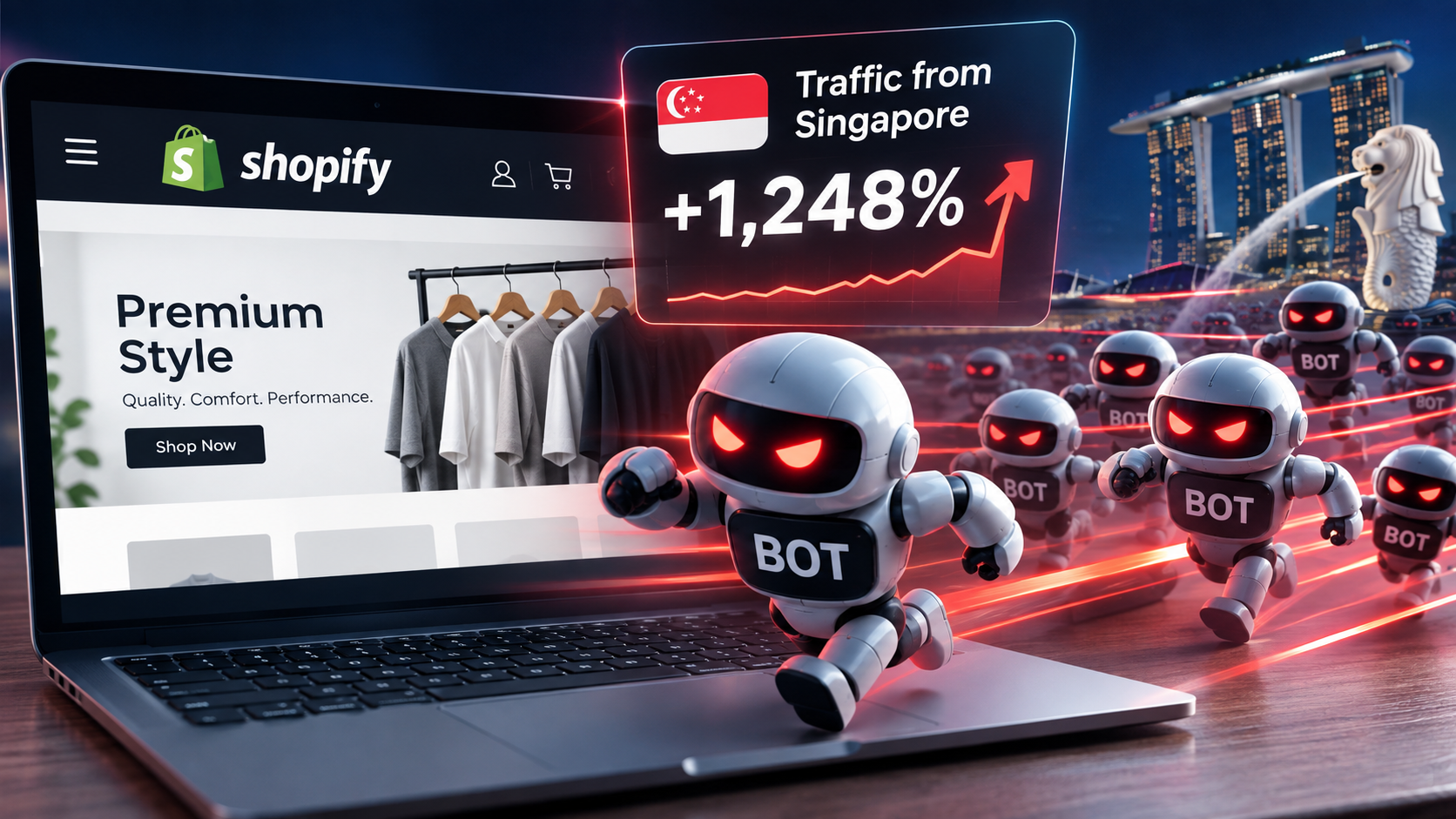
If your Shopify store has suddenly picked up a wave of traffic from Singapore that lands, bounces in under a second and buys nothing, you are almost certainly looking at bots, not buyers. Since late 2025 a coordinated wave of non-human traffic has been hitting Shopify stores, WordPress sites and just about anything with a public URL, concentrated in Singapore and parts of China, often with a smaller batch resolving to a single data-centre location in the US. It shows up in your GA4 dashboard and in your Shopify reports, and right now neither platform is reliably filtering it out. The danger is not the traffic. It is the decisions you make when you trust it. Here is how to tell the difference, why Shopify stores are especially exposed, and how to filter it out so you are reading real numbers again.
In this article
- Why is my Shopify store getting a traffic spike from Singapore?
- Why are Shopify stores more exposed than other platforms?
- Doesn’t Shopify filter bot traffic out automatically?
- The expensive mistake: fixing a checkout that was never broken
- How can I tell bot traffic from real customers?
- Is all bot traffic bad news?
- How do I filter this traffic out and read real numbers?
- Frequently asked questions
Why Is My Shopify Store Getting A Spike In Traffic From Singapore?
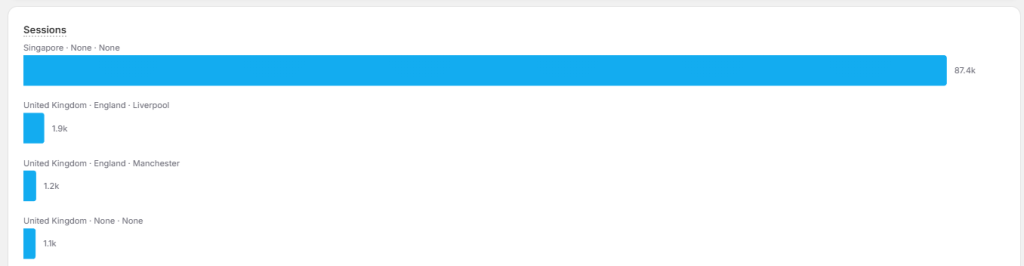
The short answer: automated traffic. A large, coordinated wave of bots has been sweeping across ecommerce sites since roughly September 2025, and Singapore keeps coming out on top of the country reports because so much of that infrastructure runs through Singapore-based cloud and VPN exit nodes.
Two separate things are usually happening at once:
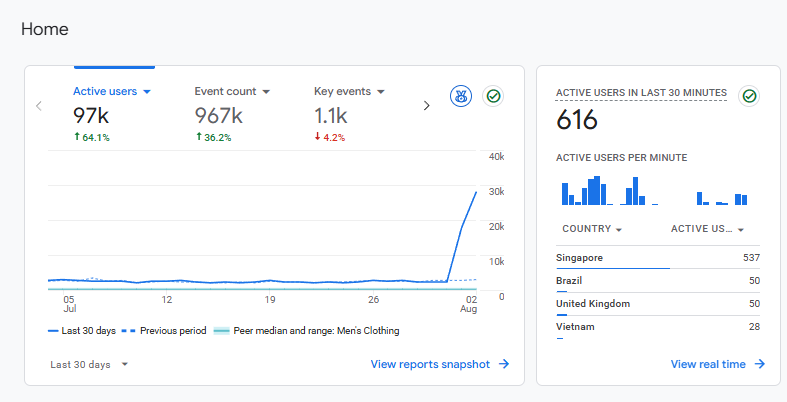
- In GA4, a lot of it is “ghost” traffic. Bots fire Google’s measurement calls without ever properly loading your site. Google has confirmed this is inauthentic, non-human traffic that its automatic filtering does not yet catch. It shows up as Direct, with next to no engagement, appears in your Realtime report, and often leaves no trace in server logs at all.
- In your Shopify reports, a lot of it is genuine crawling of your storefront. The biggest culprit is Bytespider, ByteDance’s AI crawler (the company behind TikTok), which is harvesting web content to train its models. It crawls aggressively, can hit thousands of pages an hour, and has a well-documented habit of ignoring robots.txt.
There is a neat tell that ties the whole thing together. When site owners block Bytespider by its user-agent, its origin IP frequently shifts from China to Singapore. Block the country, and the traffic simply reroutes. That is why Singapore dominates the data and why a blanket country block is not the fix people expect it to be.
Why Are Shopify Stores More Exposed Than Other Platforms?
This is the part most merchants miss, and it is the reason a WordPress site owner can swat this away in an afternoon while a Shopify merchant feels stuck.
On a self-hosted site, you control your own DNS and server, so you can put Cloudflare in front of the whole thing and block bad traffic at the network edge before it ever reaches your site. On Shopify, you can’t. Shopify terminates your storefront traffic at its own edge, which means you cannot proxy your store through Cloudflare or apply a proper web application firewall unless you are on Shopify Plus with enterprise-level DNS control.
It gets worse. The bot-blocker apps in the Shopify App Store run after Shopify has already served the page. By the time an app sees the request, the bot has been counted and the content has been delivered. Apps can tidy up your reporting, but they cannot stop a crawler at the door. So the average Shopify merchant is left filtering data after the fact rather than blocking traffic before it lands. That is an architectural limitation, not something you have done wrong.
Doesn’t Shopify Filter Bot Traffic Out Automatically?
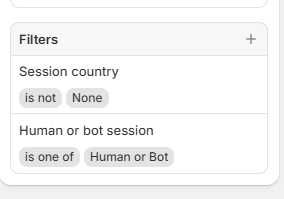
It does partly, and this is where a lot of the confusion comes from. In October 2025 Shopify added a “Human or bot session” filter and dimension to its analytics, so you can split real customers from automated traffic in your reports.
It is a genuinely useful addition. But there are three catches that matter right now:
- It is not on by default. Your standard dashboard still includes bot sessions, so the conversion rate you glance at every morning is being dragged down by traffic that was never going to buy.
- It only applies to new data from 7 October 2025 onwards and only to sessions-related metrics. It cannot reclassify anything older.
- It is deliberately conservative. Shopify would rather miss a few bots than wrongly label a real customer as one. The trouble with a brand new wave like this is that conservative classification is exactly the setting most likely to wave it through.
So the honest position is this: the filter exists, it helps, but it is not catching everything, and it is not doing it by default. You still have to know what you are looking at. You can read Shopify’s own explanation of how the classification works on the Shopify Help Center bot filtering page.
The Expensive Mistake: Fixing a Product Page Or Checkout That Was Never Broken
Here is why this matters beyond a bit of messy data. When you don’t know the traffic is fake, you go through a very predictable, very costly thought process.
First comes the excitement: “Look at all this traffic.” Then the confusion: “Why isn’t any of it converting?” Then the panic: “Something must be broken in my checkout.” I have had exactly this from a client who was convinced their checkout had developed a fault, when in reality their real conversion rate had not moved a single percentage point. The bots had simply inflated the denominator.
From there, merchants start spending money to solve a problem that does not exist. They go looking for conversion rate optimisation work to “fix” traffic that was never going to convert. They tear apart a checkout that was working fine. They question their product, their pricing, their photography. All of it triggered by a number that was never real in the first place.
There is a second, quieter cost too. This traffic pollutes the audiences you feed to Meta and Google Ads. If your pixel is learning from thousands of Singapore sessions that bounce instantly, it is optimising against noise, and your ad performance suffers for it. Diagnosing this correctly is not housekeeping. It is protecting the decisions the whole business is built on.
How can I tell bot traffic from real customers?
Bot traffic has a fingerprint. Once you have seen it a few times you can spot it in seconds. The single clearest signal is the classic one: sessions up, orders flat or down. If traffic doubles and revenue does not move, most of that traffic is not human.
Here is what a suspect session tends to look like against a genuine one:
| Signal | Looks like a bot | Looks like a customer |
|---|---|---|
| Location | Singapore, China or a single US data-centre city, appearing in batches | Spread across the regions you actually sell to |
| Time on site | Under one second average engagement | Seconds to minutes, with pages per session above one |
| Source | Almost all Direct, arriving in sudden hourly bursts | A mix of organic, paid, email and referral |
| Behaviour | 100% bounce, no add-to-carts, no checkouts, no sales | Product views, carts started, some proportion converting |
My rule of thumb is simple. If a batch of traffic is from Singapore (or any single country arriving in clusters), has an average engagement time under a second, comes in as Direct and produces no add-to-carts and no sales, you are safe to discount it. It is not your next big market. It is noise.
Is All Bot Traffic Bad News?
No, and this is worth understanding rather than reaching straight for the block button. Automated traffic now makes up more than half of all internet activity, and roughly a quarter of bots are doing something useful. Most of the wave hitting your store won’t do anything worse than add a little server load and clutter your reports. A few categories are worth knowing about:
- Search and AI crawlers (mostly welcome). Googlebot and Bingbot index your product pages so shoppers can find you. The newer AI answer-engine crawlers do something similar for tools like ChatGPT and Perplexity, and being crawled is how you end up cited in their answers. You generally want these. If you are thinking about that side of things, it connects directly to my guide on ecommerce SEO in the AI age.
- Sneaker and restock bots (it depends). If you stock limited-edition products or anything with a strong resale market, monitoring bots will hammer your product and restock pages waiting for stock to land. Yes, that is automated traffic hitting you repeatedly. But at the end of it, some of those bots exist to alert a real person the moment you restock, and that person buys. So the same behaviour that inflates your sessions can also produce genuine sales. Judge it on outcomes, not on the raw session count.
- Scrapers and rogue affiliates (keep an eye on it). Some sites scrape your product data to list your items and earn affiliate commission without ever taking a proper feed from you. It is less common than it used to be, but I would not rule it out. Occasionally scraping tips into something nastier, such as a cloned storefront set up for fraud.
- Card-testing bots (the genuinely dangerous one). This is the category to take seriously. These bots run stolen card numbers through your checkout in bulk to find live ones, which triggers failed payments and chargebacks and can put your payment processing at risk. A rush of failed payment attempts in quick succession is your warning sign here, and it is a very different problem from a harmless Singapore crawl.
How Do I Filter This Traffic Out And Read Real Numbers?
You have two jobs: clean up GA4, and read your Shopify conversion rate properly. Neither of these stops the bots hitting your site (on Shopify you usually can’t, as covered above), but both get you back to trustworthy numbers.
In GA4:
- Confirm the pattern first. Open your Reports and look at traffic by Country alongside the default channel grouping. If Singapore or China is near the top, arriving as Direct with an average engagement time close to zero, that is your signal.
- Build an exclusion segment in Explore. GA4 will not let you delete data that has already been processed, so the practical fix is to stop it distorting your analysis. Go to Explore, start a blank exploration, create a new Segment set to Exclude, and add the offending pattern: Country matches Singapore (add China and the city Lanzhou if you want to be precise), narrowed further by Session source being Direct with an engagement time under a second. Apply that segment so every report you build runs on clean data.
- Keep a “humans only” view. Since you cannot retroactively scrub the numbers, set the segment up once and reuse it. When you want the truth about performance, look at that exploration rather than the default home card, which will keep including the noise.
In Shopify: open any sessions report, add the “Human or bot session” dimension, and filter to human sessions. That gives you your real conversion rate, which is almost always higher than the inflated dashboard figure. Just remember the filter is conservative and only covers data from October 2025 onwards, so treat the geography-and-engagement fingerprint above as your real test when a fresh wave appears.
If you want to go a step further and see which of these crawlers are reaching you and whether AI engines are actually reading your store, that overlaps with how you check whether ChatGPT and Perplexity cite your store. It’s the same data, but a different question.
The whole point is yes, you are seeing a lot of traffic. The skill is being informed and intentional about it, rather than blinded by a number. Knowing which traffic to act on and which to ignore is exactly the kind of diagnosis that stops you spending money in the wrong place.
Frequently Asked Questions
Why is my Shopify store suddenly getting traffic from Singapore?
It is almost certainly bot traffic. A coordinated wave of automated traffic has been hitting ecommerce sites since late 2025, much of it running through Singapore-based cloud and VPN infrastructure. It shows up as a batch of Direct sessions with near-zero engagement time and no sales. It is not a genuine new market.
Does Shopify filter out bot traffic automatically?
Only partly. Shopify added a “Human or bot session” filter in October 2025, but it is not switched on by default, it only applies to data from that date onwards, and it is deliberately conservative. Your standard dashboard still includes bot sessions, so your headline conversion rate is understated until you apply the filter yourself.
Will blocking Singapore stop the bots?
Usually not. This traffic runs on distributed infrastructure, so blocking one country tends to make it reroute through another. Bytespider, for example, shifts its origin IP from China to Singapore when it is blocked. Blanket country blocks also risk cutting off real customers, so filtering your reporting is the safer first move.
Can bot traffic hurt my Google or Meta ads?
Yes. Fake sessions pollute the audiences and conversion signals your pixels learn from. If Meta or Google is optimising against thousands of sessions that bounce instantly, your ad performance and retargeting accuracy both suffer, even though the bots never clicked an ad.
Is bot traffic ever worth keeping?
Some of it. Search engine and AI crawlers help people find and cite your store, and restock bots on high-resale products can lead to real sales. The one category to act on quickly is card-testing traffic, which shows up as a rush of failed payments and can threaten your payment processing.
Not sure whether your traffic is real?
If your sessions are up but your sales aren’t, the answer is usually in the data, not the checkout. I diagnose exactly this kind of thing for Shopify stores every week. Let’s work out what is actually going on before you spend a penny fixing the wrong problem.